
 Call us now:


Running a small business involves managing several daily activities, from handling customer orders to tracking inventory and processing payments. Whether you operate a retail store, restaurant, coffee shop, or service-based company, keeping sales organized is essential for smooth operations. Managing transactions manually can become time-consuming and may lead to errors, especially when customer activity increases.
A modern point-of-sale solution can make these responsibilities easier by bringing important business operations together in one system. A POS system for small business helps owners process transactions, monitor sales, manage inventory, and maintain accurate business records. With the right technology, small businesses can improve customer experiences, reduce administrative work, and make better decisions based on sales information.
What Is a POS System?
A point-of-sale (POS) system is a combination of hardware and software that businesses use to complete customer transactions. It is commonly used at checkout counters in retail stores, restaurants, supermarkets, and other commercial establishments.
A traditional cash register mainly records payments, while modern POS solutions offer additional features that support different business activities. Depending on the system, users can process card payments, generate digital receipts, monitor inventory, apply discounts, and review sales reports.
A typical POS setup may include a computer, tablet, barcode scanner, receipt printer, cash drawer, and payment terminal. Some modern systems also operate through mobile devices, allowing businesses to accept payments from different locations.
Why Small Businesses Need a POS System
As a business grows, managing sales and payments manually becomes increasingly difficult. Owners may struggle to track daily revenue, identify popular products, and maintain accurate inventory records.
A POS solution simplifies these activities by automating several routine tasks. Instead of recording every transaction separately, business owners can access important information through a centralized platform.
Some major benefits include:
- Faster transactions: Employees can process customer purchases more efficiently.
- Accurate sales records: Digital transaction records help reduce manual calculation errors.
- Inventory tracking: Businesses can monitor available stock and identify products that need restocking.
- Better reporting: Sales reports provide useful information about business performance.
- Improved customer service: Faster checkout processes can reduce waiting times.
- Organized operations: Owners can manage important business information from one place.
These features are particularly helpful for companies that handle multiple transactions every day.
Important Features to Look for in a POS System
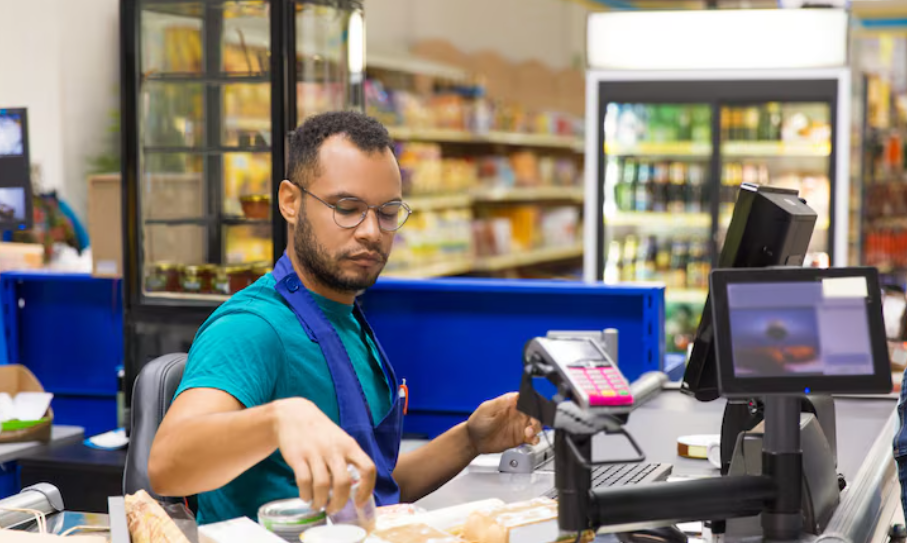
Not every POS solution offers the same features. Before choosing a platform, small business owners should identify which tools are most relevant to their daily operations.
Sales and Payment Processing
Payment processing is one of the main functions of a POS system. It allows businesses to record purchases and accept supported payment methods, such as cash, debit cards, credit cards, and digital payments.
A good system should provide a simple checkout process and generate transaction records for future reference.
Inventory Management
Inventory management helps business owners track products, monitor stock levels, and identify items that are selling quickly. Some systems automatically update inventory after each completed sale.
This feature can reduce stock-related confusion and help businesses plan purchases more effectively.
Customer Management
Customer management features allow businesses to maintain useful customer information, review purchase histories, and organize loyalty programs.
These tools can help companies understand customer preferences and develop better promotional strategies.
Sales Reports and Analytics
Reporting features provide information about daily revenue, popular products, transaction volumes, and sales trends. Business owners can use these reports to evaluate performance and identify areas that need improvement.
Employee Management
Some POS platforms include employee accounts, access permissions, shift tracking, and performance reports. These features help businesses organize staff responsibilities and monitor daily activities.
Different Types of POS Systems for Small Businesses
Businesses can choose from several types of POS solutions depending on their operations, budget, and technology requirements.
Traditional POS Systems: These systems generally use fixed checkout equipment, such as desktop computers, barcode scanners, receipt printers, and cash drawers. They are commonly found in established retail stores.
Cloud-Based POS Systems: Cloud-based platforms store business information online, allowing authorized users to access sales and inventory data through connected devices. They are useful for businesses that need flexibility and remote access.
Mobile POS Systems: Mobile solutions allow businesses to process transactions using smartphones or tablets with compatible payment equipment. They are suitable for food trucks, market stalls, pop-up shops, and businesses that operate outside traditional retail locations.
Restaurant POS Systems: These systems include specialized features such as menu management, table assignments, order tracking, and kitchen communication. They help restaurants coordinate activities between service staff and kitchen teams.
How to Choose the Right POS Solution
Choosing the right technology requires understanding your business requirements. A system designed for a restaurant may not provide all the features needed by a clothing store or a professional service company.
Consider the following factors before making a decision:
- Business requirements: Identify whether you need inventory tracking, restaurant ordering, employee management, or basic payment processing.
- Ease of use: Choose software that employees can learn without extensive technical training.
- Pricing: Review monthly subscriptions, transaction fees, hardware costs, and additional charges.
- Payment compatibility: Make sure the platform supports the payment methods your customers prefer.
- Security: Look for appropriate security features and payment data protection.
- Customer support: Reliable technical assistance is important when payment or checkout problems occur.
- Future growth: Select a solution that can support additional products, employees, or business locations as your company expands.
Comparing several providers before purchasing can help you find a solution that offers the right balance of features, reliability, and affordability.
Common Mistakes to Avoid When Selecting a POS System

Some business owners focus only on the initial price when comparing POS platforms. However, the cheapest option may not always provide the functionality required for everyday operations.
One common mistake is choosing complicated software with features that the business does not need. This can increase costs and make employee training more difficult.
Another mistake is ignoring payment processing fees and hardware compatibility. Business owners should understand the complete cost of using a system rather than looking only at its advertised subscription price.
It is also important not to overlook data security, software updates, and customer support. A reliable POS solution should help protect business information while keeping transactions running smoothly.
How a POS System Supports Business Growth
A POS platform does more than process payments. It provides useful information that can help business owners understand their customers and improve their operations.
For example, sales reports can reveal which products perform best during specific periods. Inventory records can help identify slow-moving items and reduce unnecessary purchases. Customer purchase histories can also support more relevant promotions and loyalty programs.
As a business expands, a POS system can make it easier to manage additional employees, products, and locations. These capabilities help owners maintain better control over operations without relying entirely on manual records.
Conclusion
Managing sales, payments, inventory, and customer information becomes easier when businesses use the right technology. A modern POS solution can reduce administrative work, improve transaction accuracy, and provide valuable insights into daily performance. Choosing a POS system for small business requires careful consideration of features, pricing, security, payment options, and future requirements. By selecting a suitable platform, small business owners can create a smoother checkout experience, improve operational efficiency, and build a stronger foundation for long-term growth.
[…] Read Also: POS System for Small Business: A Complete Guide to Managing Sales and Payments […]